In this guide, we will discuss the setup of the FedEx integration, along with how to use the integration and what to do if you run into any problems. This guide will not cover Order Fulfillment. Please review the associated fulfillment guide.
TABLE OF CONTENTS
- Setup
- Creating FedEx Orders
- FAQ's
- Is it possible to deliver wine shipments to a licensed FedEx location at the customer's request?
- FedEx Error - Residential Delivery. Why am I receiving this error when trying to release a FedEx order from Fulfillment?
- FedEx Error - FedEx: "We're sorry! Shipping options are unavailable at this time!"
- Error "Wine Shipping Restricted Due to State Laws"
- Error:"No FedEx services available" or "FedEx: There are no valid services
- available."
- Why are my shipping rates higher in OrderPort than on the FedEx site?
- Which shippers can I use?
- What is the declared value? What is it used for?
- Can you restrict certain shippers to certain states?
Setup
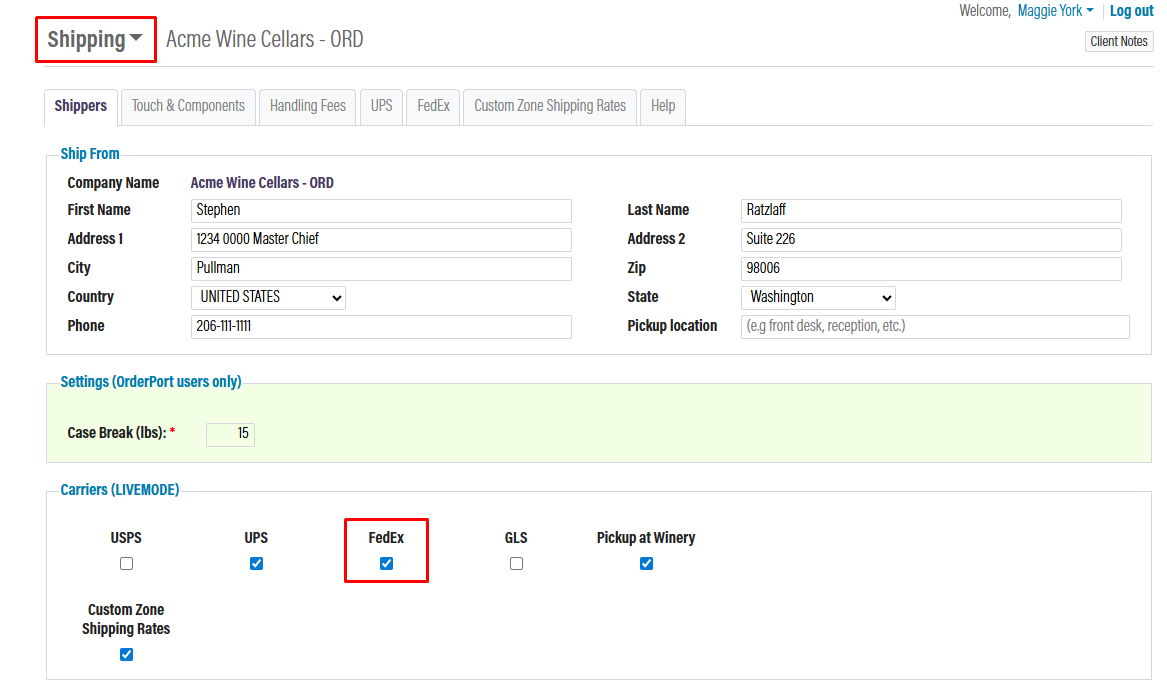
Go to the Shipping module in OrderPort Admin under the settings tab. In the Shippers tab, it must be enabled in the Carriers section. Once enabled, click "save. It will now appear as a separate tab in the module.
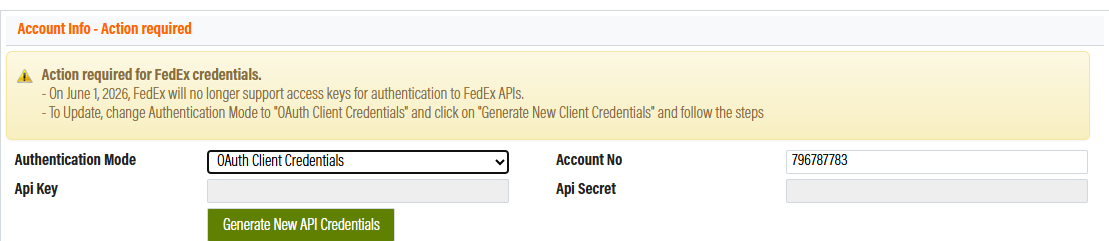
To set up the integration for the first time, set the API Authentication Mode to OAuth Client Credentials.
If you have been using FedEx access keys for the integration previously, you must migrate to the OAuth Client Credentials mode. FedEx will stop supporting access keys in 2026.
Next, input your FedEx account number, then click Generate New API Credentials.
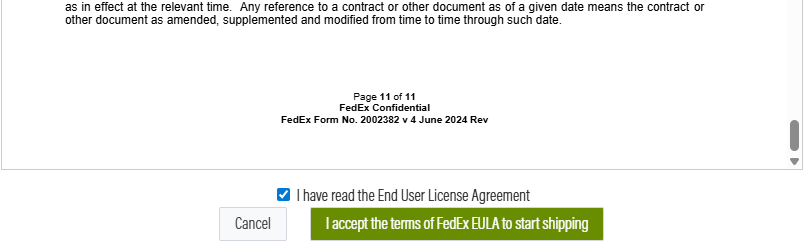
Step 1 will be to read and accept the End User Licence Agreement from FedEx. You must scroll to the bottom of the document before you can click the "I have read the End User Licenses Agreement" checkbox and accept the terms to move on to step 2.
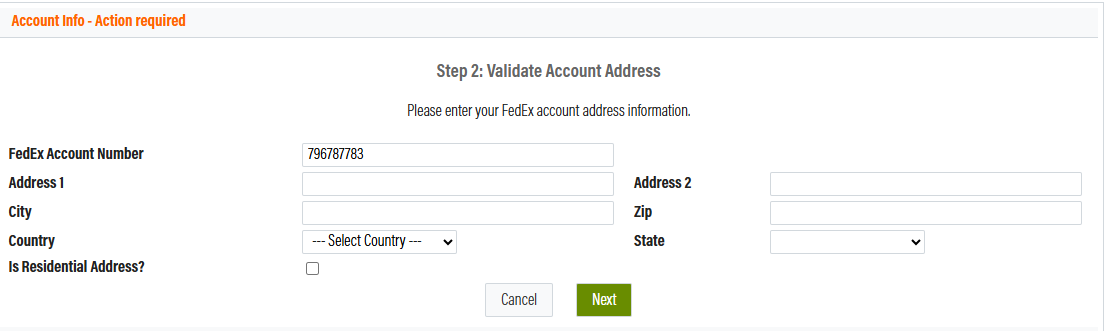
In Step 2, you will be asked for an address. Please enter your FedEx billing address here.
 In Step 3, you must verify your account. If you choose to verify using an invoice, it must be no older than six months.
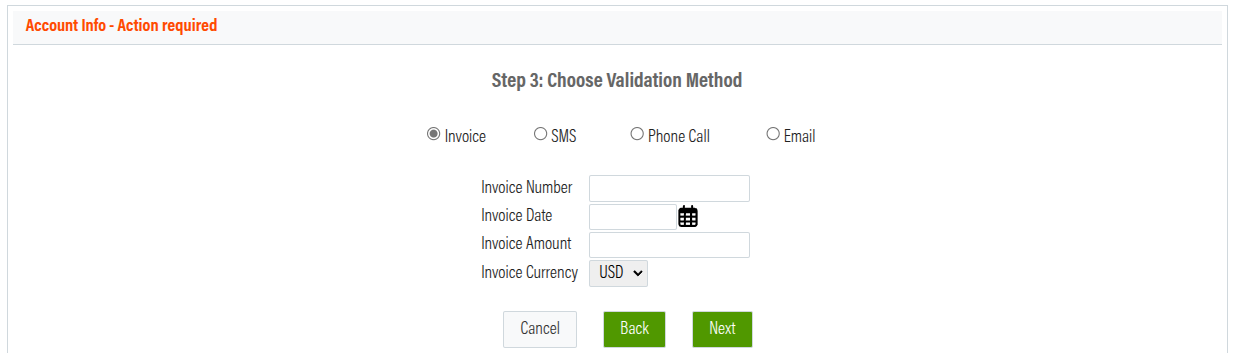
After verifying your account, you have finished connecting the systems. Once this is done, make sure to save the changes. If you fail to do so, you will need to go through the process again.
 If you receive an error message that says “Shipping prices are not available at this time,” it is possible that your FedEx account is not set up to ship alcohol. You will need to contact your FedEx account manager to get the appropriate approval on your account.
Additional Feilds
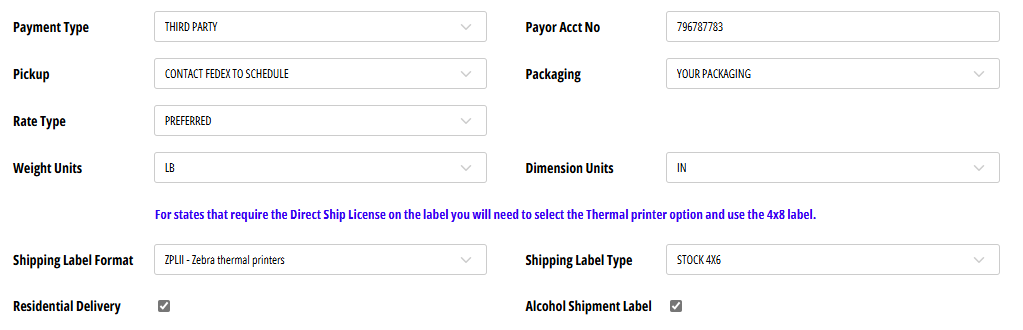
Payment Type
Pickup
Rate Type
Weight Units
Packaging
Dimension Units
Shipping Label Format
Shipping Label Type
Residential Delivery
Alcohol Shipment Label
Declared Value
Alcohol recipient type
Hold at Location
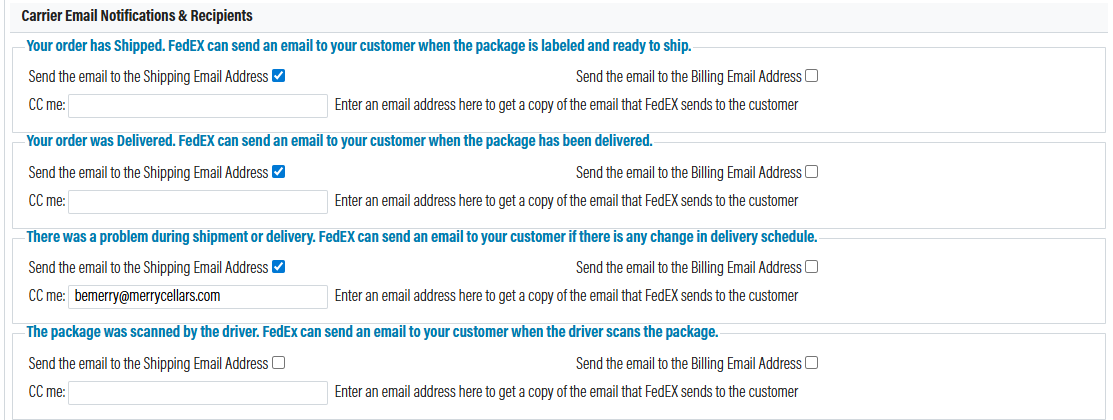
Carrier Email Notifications and Recipients
After you have setup, your account will have the option to send automated emails to customers from FedEX when certain events occur. Please review the options and decide if you want to send these emails to the customer's billing or shipping address. If nessisary you can also cc someone at the winery.
Customizations
If you want to display your client's customer class on their shipping lable you can decide to enable that from here.
Secondary Accounts
In some instances, a winery may have multiple FedEx accounts. If you need to add a secondary account, please click Add Secondary Account and go through the account setup again. When setting up a secondary shipping account, there will be a new field available titled Locations.
The only way that OrderPort can determine which FedEx account should be used is based on the ship-from location. You will need to attach this account to a specific warehouse or tasting room. All FedEx shipping orders generated with that location as the ship-from warehouse will use the secondary account. All other locations will use the primary account.
Creating FedEx Orders
Once the FedEx integration is enabled, you will see FedEx rates populate on all of our order-taking platforms. This includes Point of Sale, Webstore, Enter Orders, and Wine Club. Based on the services available with your FedEx account, those options will populate on your orders with the associated rates.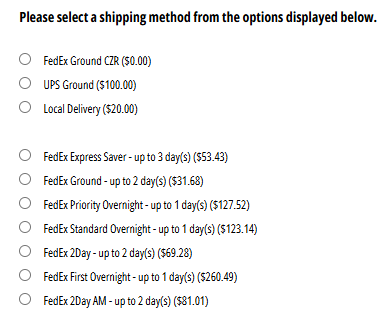

FAQ's
Is it possible to deliver wine shipments to a licensed FedEx location at the customer's request?
Wine shipments can, at the request of the customer, be delivered to licensed FedEx/Kinko’s locations. This doesn’t require any change to the status of a business’s shipping account. The winery will enter the address for a FedEx/Kinko’s location selected by the customer and specify HOLD AT LOCATION in the Company Name. The person entering the information will then have to make sure to select FedEx as the customer's preferred shipper in the shipping address window for the specified club. The package will be held for 5-7 business days, depending on the location. If the customer doesn't come pick it up during that allotted, it will be returned to the winery.
FedEx Error - Residential Delivery. Why am I receiving this error when trying to release a FedEx order from Fulfillment?

This is because this order’s shipping address qualifies for Residential or Ground Home delivery through FedEx, but this option is not turned on. Turn this option on by going to shipping setting-->FedEx-->check Residential Delivery-->Save.
FedEx Error - FedEx: "We're sorry! Shipping options are unavailable at this time!"
This could mean either that there credientals are invalid or the customer's FedEx account is not likely set up to ship Alcohol. Per the instructions below, directly from the FedEx site. The customer can also go to the below link to get additional information on the requirements for shipping alcohol.
https://www.fedex.com/en-us/shipping/alcohol.html
The authorization process for U.S. shipments
1. Have a valid FedEx account number.
You must have a FedEx account number. If you don’t have one, please go to the Create Account page on fedex.com.
2. Contact your FedEx account executive.
Contact your FedEx account executive to assist you with the authorization process. If you don’t have an assigned account executive, call FedEx Customer Service at 1.800.GoFedEx 1.800.463.3339 and request that an account executive call you.
3. Sign the alcohol shipping agreement(s).
For all alcohol shipments, you’ll need to sign a FedEx Alcohol Shipping agreement. Contact your FedEx account executive for details and assistance.
4. Review and comply with the following shipping requirements:
Use of an electronic shipping solution. You must create your shipping label using an up-to-date FedEx Ship Manager® electronic shipping solution or a FedEx-approved third-party system. (This is part of the integration with FedEx and OrderPort) Airbills are not permitted. You must identify all alcohol shipments by selecting the alcohol checkbox on your shipping software.
Packaging: Your shipment must meet FedEx alcohol packaging requirements (click to view). FedEx accepts inner packaging of molded polystyrene as preferred packaging. Pulp dividers and die-cut corrugated units are also acceptable packaging. Sturdy outer corrugated cartons are required. For a description of acceptable packaging types, click the link above.
Error "Wine Shipping Restricted Due to State Laws"
In OrderPort Administration:
This means that you do not have a valid shipping license for the address in question. To fix this, go to Sales Tax & Licenses > State Licenses and ensure that you have a valid license for each state that you are willing and able to ship to.
Error:"No FedEx services available" or "FedEx: There are no valid services
available."
When this error appears, there is something on your FedEx account that is not currently in compliance with state law. FedEx is now requiring wineries to provide a copy of their licenses for each state to which they wish to ship. If you are experiencing this, you should reach out to your FedEx account representative to ensure your account is properly set up for wine shipping.
Your compliance person will need to contact your FedEx Account Executive and resolve this. They will probably need to send copies of your state licenses to FedEx so they can enable each state. It is quite possible that your Account Exec is not yet aware of this problem.
Another reason that FedEx may not ship to a particular state is that state law prohibits some or all types of alcohol deliveries to residents. Please look at the form attached to see if the state you are attempting to ship to limits or prohibits alcohol shipments. For example, Oklahoma allows a winery to ship directly to an Oklahoma customer only if the customer ordered the wine at the winery in person. -Via FedEx
Why are my shipping rates higher in OrderPort than on the FedEx site?
The following settings may be the reason for higher shipping rates in OrderPort: In OrderPort, you may have created touch costs or handling fees. When you ship directly through FedEx, they do not request the following additional services which are required when shipping alcohol:
- PackageSpecialServiceType.ALCOHOL – shipping alcohol
- PackageSpecialServiceType.SIGNATURE_OPTION – requiring adult signature.
In OrderPort Admin, you checked the “Declared Value“ in Admin => Shipping => FedEx. This increases the price because the price is insured for the declared value of the products. When using FedEx Ground Home Delivery (in the 'Enter Orders' cart), FedEx determines the address is residential. This can also incur a surcharge.
Which shippers can I use?
The most popular shippers are FedEx, UPS, and. for those wineries in California, GLS. If you use a shipping system or warehouse system that you do not see in the shipping settings, please contact your OrderPort Representative for further questions.
What is the declared value? What is it used for?
The declared value is used when shipping products outside of the country. Carriers will create a Commercial Invoice with the declared value, which will be used by customs in the receiving country. Declared value is also used for establishing insurance claims should the products be lost or damaged in transit, and also for setting the cost of insurance for that same shipment.
Can you restrict certain shippers to certain states?
Yes, you can physically restrict shippers from certain states. Let OrderPort support know which shippers you would like restricted, and we will forward the information to our technical support team. It will be completed in 24-48 hours.