GLS or General Logistics Systems, is a parcel delivery and shipping company focused on the West Coast. They do offer shipping to additional states, which would need to be discussed with them.
TABLE OF CONTENTS
- Setup
- Secondary Accounts
- Creating GLS Orders
- FAQ's
- Error: GSO: Failure - Invalid Token
- Why am I receiving an error from GLS that I have to ship within 14 days in the future?
- What States does GLS ship to?
- Why can't I print more than one label with GLS?
- GLS is shipping to a new state.
- Which shippers can I use?
- What is the declared value? What is it used for?
- Can you restrict certain shippers to certain states?
Setup
The account holder (winery) needs to call GLS support (1-800-322-5555) and ask for the OrderPort-GLS Integration to be enabled. Once the integration has been enabled, GLS will provide the following information to the winery.
Acct: XXXXX
User Name: XXXXXXXXXXX
Password: XXXXXXXXXX*
*Please note that the password here is different from the password used by the winery to log into GLS.com. This password is specifically generated for use with the OrderPort-GLS integration and can only be obtained by contacting GLS.
Once you have this information from GLS, you need to:
- Log in to OrderPort admin at orderport.net
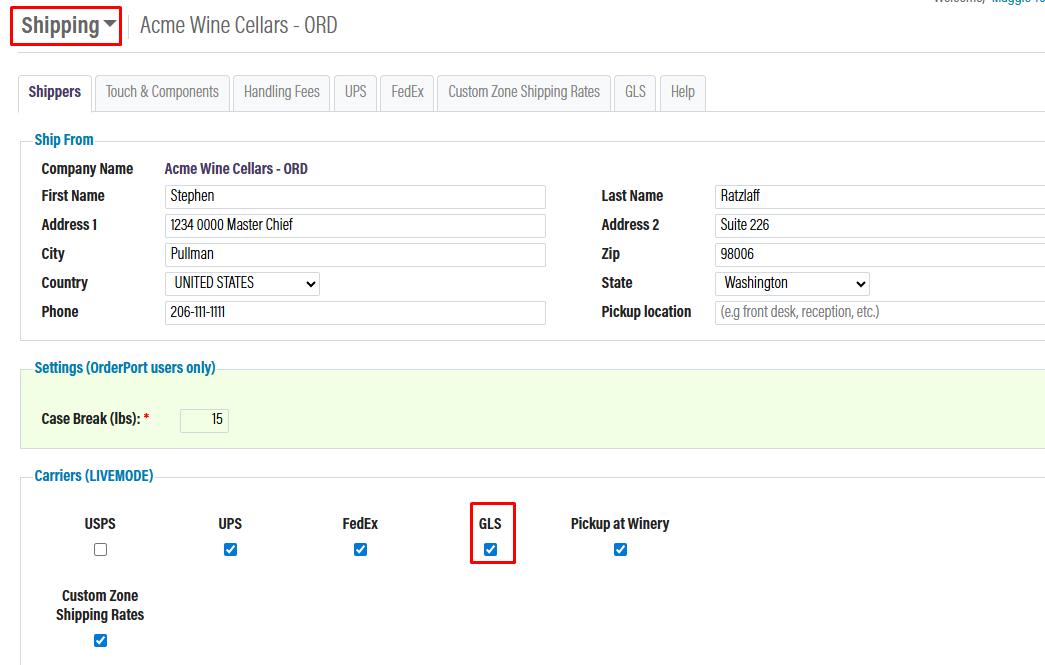
- Go to the Shipping Settings and check the GLS box.
- Open the GLS tab and plug in the values below. Click Save when you are finished.
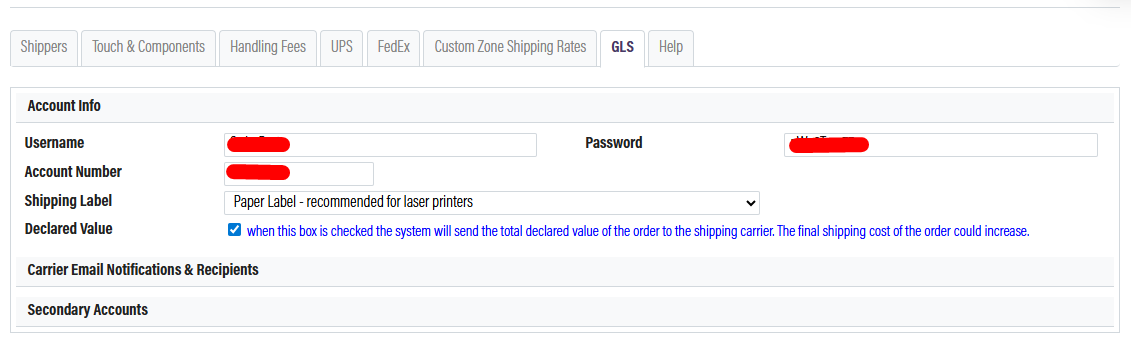
Carrier Email Notifications and Recipients
After you have setup, your account will have the option to send automated emails to customers from UPS when certain events occur. Please review the options and decide if you want to send these emails to the customer's billing or shipping address. If nessisary you can also cc someone at the winery.
Fuel Surcharge
If a winery is using GLS and if they need to have Fuel Surcharges activated, the winery must reach out to GLS to turn this on. The fuel charges vary week to week, so we cannot create an accurate fee for them to use. The Fuel Surcharge will be added into the total shipping cost, it will not be a separate line item on the order.
Secondary Accounts
In some instances, a winery may have multiple GLS accounts. If you need to add a secondary account, please click Add Secondary Account and go through the account setup again. When setting up a secondary shipping account, there will be a new field available titled Locations.
The only way that OrderPort can determine which GLS account should be used is based on the ship-from location. You will need to attach this account to a specific warehouse or tasting room. All FedEx shipping orders generated with that location as the ship-from warehouse will use the secondary account. All other locations will use the primary account.
Creating GLS Orders
Once the GLS integration is enabled, you will see GLS rates populate on all of our order-taking platforms. This includes Point of Sale, Webstore, Enter Orders, and Wine Club. Based on the services available with your GLS account, those options will populate on your orders with the associated rates.
If you would like any of these rates hidden, please reach out to the helpdesk. If you do not see any rates applying, please check that all of the items in the cart have a weight associated with them in the Catalog Manager. The way OrderPort and GLS communicate is based on the weight of the items and the address to determine the shipping rates.
FAQ's
Error: GSO: Failure - Invalid Token
The account credentials are incorrect. Please contact GLS and ensure you recived the OrderPort integration credentials.
Why am I receiving an error from GLS that I have to ship within 14 days in the future?
The following error message is:
GLS: # DATE MUST BE WITHIN 14 DAYS IN FUTURE FROM CURRENT DATE & EXCLUDE WEEKEND/GLSSERVICE HOLIDAY #
This error is coming directly from GLS. You can contact GLS directly to find out how to get around this message. Our only advice is to build your club on Tuesday, after the holiday. We see this error every year.
What States does GLS ship to?
CA, NV, AZ, WA, OR, ID, UT, NM, CO.
Why can't I print more than one label with GLS?
GLS: Another reason would be if the customer is using GLS as their shipper. GLS cannot support printing multiple labels for a single order. This is a GLS limitation, which OrderPort cannot control.
GLS is shipping to a new state.
If GLS updates which state they are shipping to, please contact helpdesks@orderport.net and provide us with a link to the GLS updated states. We will then submit that informtion to our development team to get added to the integration.
Which shippers can I use?
The most popular shippers are FedEx, UPS, and for those wineries in California, GLS. If you use a shipping system or warehouse system that you do not see in the shipping settings, please contact your OrderPort Representative for further questions.
What is the declared value? What is it used for?
The declared value is used when shipping products outside of the country. Carriers will create a Commercial Invoice with the declared value, which will be used by customs in the receiving country. Declared value is also used for establishing insurance claims should the products be lost or damaged in transit and also for setting the cost of insurance for that same shipment.
Can you restrict certain shippers to certain states?
Yes, you can physically restrict shippers from certain states. Let OrderPort support know which shippers you would like restricted, and we will forward the information to our technical support team. It will be completed in 24-48 hours.